Your everyday driving companion

A little heads-up.
A calmer drive.

Keep your navigation open. Get a little heads-up about cameras ahead, with background reminders and saved offline data.

Coming soonGoogle Play
Coming soonApp Store

Google Play coming soon · iPhone app planned · Planned pricing

Built for the road ahead
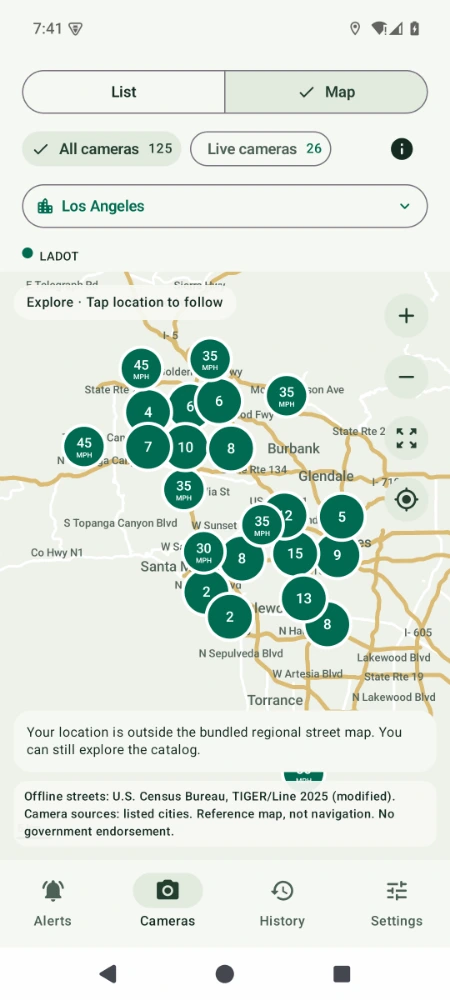
Actual Android app displaying published camera locations on its street map
Awareness, without the noise.Navigation open? Phone locked?
Your reminders can keep working.
241 Published locations in our catalog
7 California cities represented
Offline Saved data for more dependable reminders
In control Your reminders. Your preferences.
Built around the way you actually drive

Keep your navigation.
Add a little awareness.

Busy roads, changing limits, unfamiliar streets. A quiet reminder can help you notice your speed before a camera comes into view.

01 / IN THE BACKGROUND

Your favorite navigation.
Our camera reminders.

Keep using your map, music or another app. Once monitoring is enabled and permissions are set, California Speed Cameras can keep watching for published camera locations in the background.

No need to keep our map open.
02 / LESS SCREEN TIME

Phone locked.
Still a heads-up.

Voice or chime reminders can alert you with the screen off. Supported notifications can appear on the lock screen, subject to your phone’s permissions, sound and notification settings.

Choose your setup before you drive.
03 / MORE INTENTION

Notice your speed.
Build a better habit.

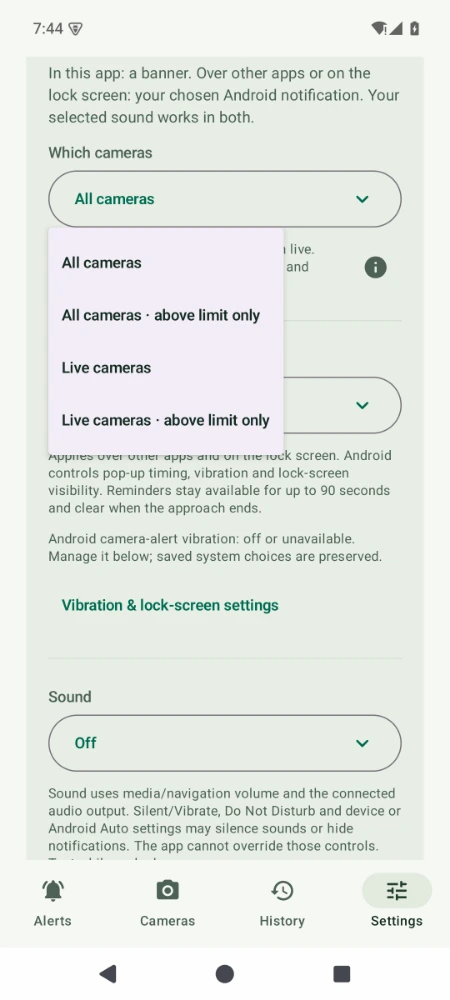
Choose reminders for all published cameras or only live ones. Prefer fewer alerts? Use the above-limit option where a speed limit is known, and make awareness part of your routine.

A helpful cue to check the posted limit.
A useful reminder. A bigger purpose.

Better awareness can be a small part
of making roads safer for everyone.

Our goal is simple: help drivers notice their speed and make more considered choices around people, neighborhoods and schools. The app supports your attention; it never replaces safe driving.

Explore the app’s features ↗Offline camera data · Four reminder modes · No MovingNow account
Your everyday driving companion

Made for your drive.
Set up your way.

A camera map is useful before you leave. On the road, a well-timed reminder is more useful than another screen to watch. California Speed Cameras brings both together.

Background reminders that fit your routine

Use another app or lock your phone while monitoring runs. Choose voice or a chime and the reminder mode that suits you; phone settings and permissions still apply.

Saved data. Less dependence on signal.

Use the saved camera database and street reference offline. Internet is needed to check and download verified updates.

Your drives stay on your device

No MovingNow account, advertising SDK or trip uploads. Optional diagnostics are previewed and shared only when you choose.

Coming soonGoogle Play
Coming soon · iOS plannedApp Store

Store releases are coming soon. See planned Android pricing. Actual Android screenshots shown; features may differ by platform.

Android camera map with published locations
The map
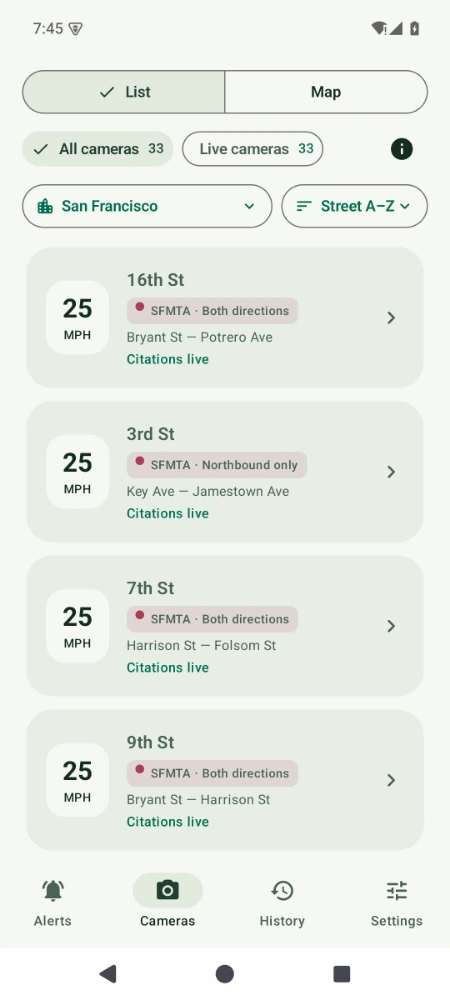
Android directory showing camera streets and statuses
The directory
Android camera alert preferences
Your preferences

A reminder is not a guarantee. GPS, permissions, background restrictions, silent mode and Do Not Disturb can affect alerts. Continuous location and a visible map can increase battery use. Set up before driving, obey signs and stay attentive.

Simple to make part of your routine

Set it up. Make it yours. Keep driving.

  1. Allow the essentials

    Follow the setup guide for location, background access and notifications. Do this while parked.

  2. Choose your reminders

    Pick your cameras, voice or chime, and advance reminder setting. Enable monitoring when you want alerts.

  3. Use your phone your way

    Open your navigation or lock the screen. Monitoring can continue until you disable it, subject to Android settings.

The camera atlas

A look at what’s ahead.

Search a street, choose a city, and explore published locations. A planned location is not necessarily an active camera.

Loading published camera locations…
Citations Warnings Planned / other
Street reference: U.S. Census TIGER/Line 2025 · Camera sources: cities · Approximate locations

Loading directory…

Select a location

See its published status, speed limit and source.

Saved catalog · checking published version… Source dates are shown per location.

Drag to pan. Use + / − or pinch to zoom. Street reference is simplified and covers selected areas; this is not a navigation map. Markers may represent corridor midpoints. Speeds can include reviewed supplemental sources, identified in location details.

Browse all 241 published locations — text directory
  • Glendale: Glendale AveMonterey Rd – Verdugo Rd · planned
  • Glendale: Brand BlvdMagnolia Ave – Maple St · planned
  • Glendale: Glenoaks BlvdKenilworht Ave – Central Ave · planned
  • Glendale: San Fernando RdCalifornia Ave – Colorado St · planned
  • Glendale: Glenoaks BlvdRosedale Ave – Cleveland Rd · planned
  • Glendale: Glenoaks BlvdAllen Ave – Ruberta Ave · planned
  • Glendale: Brand BlvdHarvard St – Lexington · planned
  • Glendale: Central AveBroadway – Doran Ave · planned
  • Glendale: Chevy Chase DrLilac Ln – Sinclair Ave · planned
  • Los Angeles: Beverly BlvdWitmer St – Belmont Ave · warning live
  • Los Angeles: Cypress AveMacon St (midblock) – Cazador St · construction
  • Los Angeles: N Figueroa StS Cessna Ln – W Avenue 45 · construction
  • Los Angeles: S Figueroa StW 23rd St – W Adams Blvd · construction
  • Los Angeles: W 8th StS Hoover St – S Westmoreland Ave · warning live
  • Los Angeles: W Olympic BlvdS Hoover St – Elden Ave · construction
  • Los Angeles: W Washington BlvdS Vermont Ave – S New Hampshire Ave · construction
  • Los Angeles: Wilshire BlvdS Park View St – S La Fayette Park Pl · construction
  • Los Angeles: S La Cienega BlvdBowesfield St – Coliseum St · warning live
  • Los Angeles: W Olympic BlvdFedora St – Irolo St · construction
  • Los Angeles: S La Cienega BlvdW 18th St – Sawyer St · construction
  • Los Angeles: W 6th StS Vermont Ave – S Berendo St · construction
  • Los Angeles: W Jefferson BlvdS Bronson Ave – Crenshaw Blvd · construction
  • Los Angeles: W Washington BlvdS Van Ness Ave – 3rd Ave · construction
  • Los Angeles: S Western AveW Adams Blvd – W 24th St · construction
  • Los Angeles: S La Brea AveColiseum St – Veronica St · construction
  • Los Angeles: Arlington AveW 18th St – W Adams St · construction
  • Los Angeles: Venice BlvdLincoln Blvd – Pisani Pl · warning live
  • Los Angeles: National Blvd405 Fwy – Webster Middle School (driveway) · warning live
  • Los Angeles: S Barrington AveSanta Monica Blvd – Ohio Ave · construction
  • Los Angeles: Washington BlvdThatcher Ave – Marr St · construction
  • Los Angeles: La Tijera BlvdW 74th St – W Manchester Ave · construction
  • Los Angeles: Vista Del MarCity Limit – Culver Blvd · construction
  • Los Angeles: Mulholland DrCalvena Dr – Corda Dr · construction
  • Los Angeles: S Slauson AveBraddock Dr – Culver Blvd · construction
  • Los Angeles: Balboa BlvdLassen St – Plummer St · warning live
  • Los Angeles: Balboa Blvd118 Fwy – Tulsa St · construction
  • Los Angeles: Nordhoff StGothic Ave – Petit Ave · warning live
  • Los Angeles: Nordhoff StYolanda Ave – Geyser Ave · construction
  • Los Angeles: Reseda BlvdSuperior St – Kinzie St · construction
  • Los Angeles: Tampa AveLassen St – Merridy St · construction
  • Los Angeles: Burbank BlvdSepulveda Blvd – Kester Ave · construction
  • Los Angeles: Sesnon BlvdHigh Glen Way – Reseda Blvd · construction
  • Los Angeles: Valley Circle BlvdHighlander Rd – Victory Blvd · construction
  • Los Angeles: N Highland AveHollywood Blvd – W Sunset Blvd · construction
  • Los Angeles: W Sunset Blvd101 Fwy – N Bronson Ave · construction
  • Los Angeles: W Sunset BlvdN Alvarado St – Rosemont Ave · construction
  • Los Angeles: W Sunset BlvdN McCadden Pl – N Sycamore Ave · construction
  • Los Angeles: Santa Monica BlvdN Normandie Ave – N Hobart Blvd · warning live
  • Los Angeles: Riverside DrAllesandro St – Riverside Ter · construction
  • Los Angeles: W 3rd StS Commonwealth Ave – S Virgil Ave · construction
  • Los Angeles: N Vermont AveMarathon St – Melrose Ave · construction
  • Los Angeles: E 4th StS Boyle Ave – S Pecan St · construction
  • Los Angeles: E 4th StS Evergreen Ave – S Mott Ave · construction
  • Los Angeles: S San Pedro StE 15th St – E 17th St · construction
  • Los Angeles: S San Pedro StWinston St – E 6th St · construction
  • Los Angeles: W 7th StS Grand Ave – S Flower St · construction
  • Los Angeles: S Soto StE 4th St – E 6th St · construction
  • Los Angeles: Huntington DrMonterey Rd – Topaz St · construction
  • Los Angeles: Marengo StLord St – N Mission Rd · construction
  • Los Angeles: N Avalon BlvdE N St – W Sandison St · construction
  • Los Angeles: S Central AveE 109th St – E 114th St · construction
  • Los Angeles: Grandee AveE Century Blvd – E 108th St · construction
  • Los Angeles: E 103rd StGrandee Ave – Fifth Blvd (midblock) · construction
  • Los Angeles: Wilmington AveE 110th St – E 113th St · construction
  • Los Angeles: S Gaffey StW 1st St – W 2nd St · warning live
  • Los Angeles: E Imperial HwyStanford Ave – Avalon Blvd · construction
  • Los Angeles: Vermont Ave253rd St – 255th St · construction
  • Los Angeles: Coldwater Canyon AveBassett St – Vanowen St · warning live
  • Los Angeles: Laurel Canyon BlvdVanowen St – Archwood St · construction
  • Los Angeles: Magnolia BlvdKlump Ave – Tujunga Ave · construction
  • Los Angeles: Oxnard StColdwater Canyon Ave – Ethel Ave · warning live
  • Los Angeles: Sherman WayCostello Ave – N Cedar Rd · construction
  • Los Angeles: Vanowen StGoodland Ave – Morse Ave · construction
  • Los Angeles: Victory BlvdColdwater Canyon Ave – Ethel Ave · warning live
  • Los Angeles: Victory BlvdVentura Canyon Ave – Mammoth Ave · construction
  • Los Angeles: Victory BlvdLA River – Canby Ave · construction
  • Los Angeles: Reseda BlvdVictory Blvd – Erwin St · construction
  • Los Angeles: Winnetka AveStrathern St – Arminta St · construction
  • Los Angeles: Ventura BlvdChalk Hill – Winnetka Ave · construction
  • Los Angeles: Vanowen StCorbin Ave – Hatillo Ave · construction
  • Los Angeles: Reseda BlvdValerio St – Wyandotte St · construction
  • Los Angeles: Sherman WayVanalden Ave – Calvin Ave · construction
  • Los Angeles: Victory BlvdTampa Ave – Belmar Ave · construction
  • Los Angeles: N Highland AveCamrose Dr – Franklin Pl · warning live
  • Los Angeles: Victory BlvdLA River – Newcastle Ave · construction
  • Los Angeles: N Western AveLos Feliz Blvd – Franklin Ave · warning live
  • Los Angeles: Sherman WayZelzah Ave – Lindley Ave · construction
  • Los Angeles: Hollywood BlvdCamino Palmero St – N Vista St · construction
  • Los Angeles: Franklin AveTamarind Ave – Cheremoya Ave · warning live
  • Los Angeles: Fountain AveHyperion Ave – N Hoover St · construction
  • Los Angeles: White Oak AveVentura Blvd – Margate St · construction
  • Los Angeles: S La Cienega BlvdHorner St – W 18th St · construction
  • Los Angeles: S La Cienega BlvdW Olympic Blvd – W Pico Blvd · warning live
  • Los Angeles: N La Brea AveBeverly Blvd – W 1st St · warning live
  • Los Angeles: W Olympic BlvdS Sycamore Ave – S La Brea Ave · warning live
  • Los Angeles: N Fairfax AveWaring Ave – Clinton St · warning live
  • Los Angeles: W Olympic BlvdStearns Dr – Alvira St · warning live
  • Los Angeles: Melrose AveN Orange Grove Ave – N Hayworth Ave · warning live
  • Los Angeles: W Olympic Blvd405 Fwy – Greenfield Ave · construction
  • Los Angeles: Nordhoff StCedros Ave – Pacoima Wash · construction
  • Los Angeles: Balboa BlvdArchwood St – Orange Line Busway · construction
  • Los Angeles: Victory BlvdHigh Tech Los Angeles East Driveway – Louise Ave · construction
  • Los Angeles: Victory BlvdCedros Ave – Noble Ave (midblock) · warning live
  • Los Angeles: Vanowen StColumbus Ave – Firmament Ave · construction
  • Los Angeles: Sherman WaySherman Cir (midblock) – Kester Ave · construction
  • Los Angeles: Sepulveda BlvdSaticoy St – Stagg St · construction
  • Los Angeles: Woodman AveStrathern St – Roscoe Blvd · construction
  • Los Angeles: Woodman AveNordhoff St – Terra Bella St · construction
  • Los Angeles: Sepulveda BlvdPlummer St – Tupper St · warning live
  • Los Angeles: Van Nuys BlvdLaurel Canyon Blvd – 5 Fwy · construction
  • Los Angeles: Foothill BlvdSherman Grove Ave – Newhome Ave · warning live
  • Los Angeles: Laurel Canyon BlvdHoyt St – Pinney St · construction
  • Los Angeles: Polk StFellows Ave (midblock) – Glenoaks Blvd · construction
  • Los Angeles: Laurel Canyon BlvdPacoima Wash – Wolfskill St · construction
  • Los Angeles: Nordhoff StPacoima Wash – Noble Ave · construction
  • Los Angeles: Van Nuys BlvdDe Garmo Ave – Herrick Ave · construction
  • Los Angeles: W Florence AveS Hoover St – S Vermont Ave · warning live
  • Los Angeles: S Vermont AveW 68th St – W Florence Ave · warning live
  • Los Angeles: S Figueroa StW 83rd St – W Manchester Ave · construction
  • Los Angeles: W Florence AveHaas Ave – 2nd Ave · construction
  • Los Angeles: W Gage AveRaymond Ave – S Halldale Ave · construction
  • Los Angeles: S Normandie AveW 64th St – W 62nd St · construction
  • Los Angeles: W Martin Luther King Jr. BlvdS Saint Andrew Pl – S Hobart Blvd · construction
  • Los Angeles: S Western AveW 53rd St – W 55th St · construction
  • Los Angeles: S Figueroa StW Gage Ave – W 68th St · construction
  • Los Angeles: W Slauson AveMenlo Ave – S Budlong Ave · construction
  • Los Angeles: S Vermont AveW 57th St – W 58th Pl · construction
  • Los Angeles: E Manchester AveS Central Ave – Wadsworth Ave · construction
  • Los Angeles: S Figueroa StW 62nd St – W Gage Ave · construction
  • Los Angeles: W Gage AveS Figueroa St – S Hoover St · construction
  • Los Angeles: E Vernon AveMcKinley Ave – Hooper Ave (midblock) · construction
  • Los Angeles: W Slauson AveInskeep Ave (midblock) – Brentwood St · construction
  • Los Angeles: Avalon BlvdE 74th St – E 77th St · construction
  • Los Angeles: S Central AveE 90th St – E 92nd Ave · construction
  • Long Beach: Bellflower BlvdStearns – Willow · warning live
  • Long Beach: 2nd StBay Shore – Appian · warning live
  • Long Beach: 7th StPark – Santiago · warning live
  • Long Beach: Anaheim StRedondo – Termino · warning live
  • Long Beach: Atlantic AveLA River – Artesia · warning live
  • Long Beach: Cherry AveWardlow – Bixby · warning live
  • Long Beach: 7th StCherry – Termino · warning live
  • Long Beach: Long Beach BlvdArtesia – 70th · warning live
  • Long Beach: Long Beach BlvdSan Antonio – 45th · warning live
  • Long Beach: Long Beach BlvdVictoria – Market · warning live
  • Long Beach: Artesia BlvdHarbor – Butler · warning live
  • Long Beach: Willow StPacific – Atlantic · warning live
  • Long Beach: Anaheim StAtlantic – Walnut · warning live
  • Long Beach: Ocean BlvdAlamitos – Orange · warning live
  • Long Beach: Pacific AveWillow – PCH · warning live
  • Long Beach: Shoreline DrPine – Ocean · warning live
  • Long Beach: Ocean BlvdPacific – Atlantic · warning live
  • Long Beach: Santa Fe AvePCH – 20th · warning live
  • Malibu: Pacific Coast HwyDecker Rd – Decker Rd · pre launch
  • Malibu: Pacific Coast HwyMorning View Dr – Morning View Dr · pre launch
  • Malibu: Pacific Coast HwyLatigo Canyon Rd – Latigo Canyon Rd · pre launch
  • Malibu: Pacific Coast HwyCarbon Beach Ter – Carbon Canyon Rd · pre launch
  • Malibu: Pacific Coast HwyTuna Canyon Rd – Tuna Canyon Rd · pre launch
  • Oakland: West GrandChestnut – Linden · citation live
  • Oakland: 7th StAdeline St – Linden St · citation live
  • Oakland: San Pablo AvenueAthens – Sycamore · citation live
  • Oakland: 7th StBroadway – Franklin Streets · citation live
  • Oakland: Broadway26th – 27th St · citation live
  • Oakland: MLK Jr Way42nd – 43rd · citation live
  • Oakland: Foothill Blvd19th – 20th · citation live
  • Oakland: Foothill BlvdIrving – 24th · citation live
  • Oakland: Fruitvale AvenueGalindo Street – Logan Street · citation live
  • Oakland: International40th – 41st · citation live
  • Oakland: Bancroft AveAt 62nd Ave – At 62nd Ave · citation live
  • Oakland: 73rd AvenueFresno – Krause · citation live
  • Oakland: Bancroft Ave86th Ave – Auseon Ave · citation live
  • Oakland: Hegenberger RoadSpencer – Hawley · citation live
  • Oakland: 98th AvenueBlake Drive – Gould Street · citation live
  • Oakland: 98th AvenueCherry – Birch · citation live
  • Oakland: MacArthur BlvdGreen Acre Road – Enos Ave · citation live
  • Oakland: Claremont AvenueHillegass Avenue – College Avenue · citation live
  • San Francisco: Fulton St42nd Ave – 43rd Ave · citation live
  • San Francisco: Fulton St2nd Ave – Arguello Blvd · citation live
  • San Francisco: Geary Blvd7th Ave – 8th Ave · citation live
  • San Francisco: Bay StOctavia St – Gough St · citation live
  • San Francisco: Franklin StUnion St – Green St · citation live
  • San Francisco: BroadwayPowell St – Stockton St · citation live
  • San Francisco: EmbarcaderoGreen St – Battery St · citation live
  • San Francisco: Columbus AveLombard St – Greenwich St · citation live
  • San Francisco: Lincoln Way27th Ave – 28th Ave · citation live
  • San Francisco: Turk StVan Ness Ave – Polk St · citation live
  • San Francisco: Harrison St4th St – 5th St · citation live
  • San Francisco: 7th StHarrison St – Folsom St · citation live
  • San Francisco: 10th StHarrison St – Folsom St · citation live
  • San Francisco: Bryant St2nd St – 3rd St · citation live
  • San Francisco: Mission St8th St – 9th St · citation live
  • San Francisco: King St4th St – 5th St · citation live
  • San Francisco: 9th StBryant St – Harrison St · citation live
  • San Francisco: Ocean AveFrida Kahlo Way – Howth St · citation live
  • San Francisco: Monterey BlvdEdna St – Congo St · citation live
  • San Francisco: San Jose Ave29th St – 30th St · citation live
  • San Francisco: Guerrero St19th St – 20th St · citation live
  • San Francisco: 16th StBryant St – Potrero Ave · citation live
  • San Francisco: Bayshore Blvd101 off-ramp – Tunnel Ave · citation live
  • San Francisco: 3rd StKey Ave – Jamestown Ave · citation live
  • San Francisco: Cesar Chavez StIndiana St – Tennessee St · citation live
  • San Francisco: Alemany BlvdFarragut Ave – Naglee Ave · citation live
  • San Francisco: Geneva AvePrague St – Brookdale Ave · citation live
  • San Francisco: Mission StOttawa Ave – Allison St · citation live
  • San Francisco: San Jose AveSanta Ynez Ave – Ocean Ave · citation live
  • San Francisco: Market StDanvers St – Douglass St · citation live
  • San Francisco: Sloat Blvd41st Ave – Skyline Blvd · citation live
  • San Francisco: Cesar Chavez StFolsom St – Harrison St · citation live
  • San Francisco: Geary BlvdWebster St – Buchanan St · citation live
  • San Jose: Alum Rock AveKing Rd – McCreery Ave · construction
  • San Jose: E Santa Clara St15th St – 19th St · construction
  • San Jose: Blossom Hill RdWest of Calpine St – West of Calpine St · construction
  • San Jose: Blossom Hill RdEast of Shadowcrest Way – East of Shadowcrest Way · construction
  • San Jose: Branham LnWest of Sutcliff Ave – West of Sutcliff Ave · construction
  • San Jose: Camden AveLancaster Dr – Lencar Way · construction
  • San Jose: N Capitol AveSouth of Cropley Ave – South of Cropley Ave · construction
  • San Jose: N Capitol AveMcKee Rd – Alum Rock Ave · construction
  • San Jose: N 1st StNorth of Montague Expy – North of Montague Expy · construction
  • San Jose: Curtner AveLincoln Ave – Celestine Ave · construction
  • San Jose: Curtner AveUnified Way – Monterey Rd · construction
  • San Jose: Tully RdSenter Rd – Galveston Ave · construction
  • San Jose: Tully RdQuimby Rd – Eastridge Ln · construction
  • San Jose: Tully RdNear Coconut Dr – Near Coconut Dr · construction
  • San Jose: Hillsdale AveMeridian Ave – Jarvis Ave · construction
  • San Jose: S Jackson AveNear Kammerer Ave – Near Kammerer Ave · construction
  • San Jose: McKee RdNear Prarie View Ct – Near Prarie View Ct · construction
  • San Jose: McKee Rd34th St – McDonald Ave · construction
  • San Jose: McLaughlin AveSouth of Malott Dr – South of Malott Dr · construction
  • San Jose: Camden AveNear Creek Bank Ct – Near Creek Bank Ct · construction
  • San Jose: Monterey RdSouth of Stauffer Blvd – South of Stauffer Blvd · construction
  • San Jose: Monterey RdFehren Dr – Southside Dr · construction
  • San Jose: Monterey RdFlintwell Way – Ford Rd · construction
  • San Jose: Quimby RdSand Point Dr – Gavilan Dr · construction
  • San Jose: Santa Teresa BlvdNear Ashburton Dr – Near Ashburton Dr · construction
  • San Jose: Santa Teresa BlvdNorth of Cheltenham Way – North of Cheltenham Way · construction
  • San Jose: Saratoga AveSouth of Country Ln – South of Country Ln · construction
  • San Jose: Saratoga AveSouth of Olga Dr – South of Olga Dr · construction
  • San Jose: Story RdBal Harbor Way – Hopkins Dr · construction
  • San Jose: Story RdEast of Senter Rd – East of Senter Rd · construction
  • San Jose: White RdCandler Ave – Sienna Dr · construction
  • San Jose: White RdCunningham Ave – Rose Creek Dr · construction
  • San Jose: White RdSouth of Westbranch Dr – South of Westbranch Dr · construction
Understand the bigger picture

One state. Different programs.

These programs aim to reduce dangerous speeding. Local rollout stages and individual camera statuses can differ.

AB 645 is a pilot, not a statewide camera network. It authorizes Los Angeles, Glendale, Long Beach, San Francisco, Oakland and San José to run speed safety camera programs. Selected streets include high-injury corridors and school areas.

Malibu’s Pacific Coast Highway program is authorized separately under SB 1297. Highway work zones have another pilot. Our map currently covers the seven city sources below, not every camera in California.

01AB 645

Los Angeles

Warning rollout

125 systems; the first activation was announced for October 26, 2026. Each location starts with 60 days of warnings.

Official city program ↗
02AB 645

San Francisco

Issuing citations

33 locations. The warning phase began in March 2025; citations began August 5, 2025.

Official city program ↗
03AB 645

Oakland

Issuing citations

18 locations. Warnings began January 14, 2026; citations began March 15, 2026.

Official city program ↗
04AB 645

Long Beach

Check city for rollout

18 locations, with direction-specific records. The city lists fall 2026 warnings and winter 2026 citations.

Official city program ↗
05AB 645

Glendale

Launch date unconfirmed

Nine selected corridors. The city’s published schedule is an estimate; check the project page for activation notices.

Official city program ↗
06AB 645

San José

Planned rollout

33 selected locations. This map includes speed-camera sites only, excluding red-light cameras.

Official city program ↗
07SB 1297

Malibu · Pacific Coast Highway

Testing; warnings planned

A separate SB 1297 program: five systems. November 2026 warnings are planned; an exact enforcement date is unconfirmed.

Official city program ↗

Program summaries reviewed November 8, 2026. Check the linked city for current rollout announcements; dates alone do not establish that a particular camera is live.

Know the rules

Small changes in speed.
Real consequences.

The AB 645 city pilot uses civil penalties beginning at 11 mph above the posted limit. That threshold is not permission to speed. Always follow the posted limit and road conditions.

  • ↗Notices go to the registered vehicle owner.
  • ↗No driver’s-license points under the city pilot.
  • ↗Initial 60-day warning periods apply.
  • ↗Eligible drivers may receive reduced fines or payment options.
AB 645 civil fine schedule
Speed above posted limit Base civil fine
11–15 mph over $50
16–25 mph over $100
26+ mph over $200
Vehicle speed of 100+ mph
Actual speed, not 100 mph over the limit
$500

After the initial warning period, a first 11–15 mph-over detection can qualify for a warning if the vehicle has not already received a warning in that jurisdiction. Eligible low-income and indigent recipients can qualify for 50% or 80% reductions; payment plans and community-service alternatives may be available. Follow the issuing city’s notice for eligibility, deadlines and review rights.

Source: SFMTA fine schedule · Long Beach program FAQ · AB 645. This table describes the city pilot, not all speeding offenses or work-zone penalties. Information, not legal advice.

A few things worth knowing

Clear answers. Before you drive.

A quick guide to the app, our public camera sources and your choices.

Using the app

What is the planned subscription price?

The planned standard Android offer in the U.S. is a 7-day free trial for eligible new subscribers, then US$1.99 per month. The subscription renews automatically until canceled. Cancel before the trial ends to avoid the first charge. Final pricing, eligibility, applicable taxes and included features will be shown before you confirm a purchase. iPhone pricing will be confirmed with its release.

Can I keep using my navigation app or lock my phone?

Yes. With monitoring enabled and the required permissions, the Android app can give camera reminders while another app is open or the phone is locked. Keep your preferred navigation running; our app adds camera awareness rather than turn-by-turn directions. Set it up and test your audio while parked.

Which camera reminders can I choose?

Choose from four modes: all cameras; all cameras above the known limit; live cameras; or live cameras above the known limit. Live includes both warning and citation stages. Above-limit modes need a known speed limit and a reliable GPS speed estimate, and stay quiet if either is missing. These choices do not change the map or your History settings.

How far ahead will the app remind me?

Choose a target of 15, 30, 45 or 60 seconds; 30 seconds is the default. Distance adjusts to GPS speed and the published camera area or street reference. Turns, signal quality and starting close to a camera can shorten the lead time. Monitoring uses sustained usable GPS speed of at least 5 mph; it is not a vehicle detector.

Can I choose sound, pop-ups and lock-screen alerts?

Choose an offline voice, a chime or no sound. In the app, reminders appear as banners. For other apps and the lock screen, choose a pop-up notification, status-bar notification or notifications off; sound is a separate choice. Vibration and lock-screen visibility follow Android settings. Silent mode, Do Not Disturb, volume and connected audio can affect what you hear or see. Background reminders need at least one sound or notification output enabled.

Will the app work without internet?

The Android app uses a saved camera database and bundled street reference for its map and reminders. Internet is needed to check and download database updates, rather than for each reminder. GPS, permissions and background operation are still needed. This website’s interactive map is separate from the app’s offline features.

Does background monitoring affect battery life?

Continuous GPS, background activity and a visible map can use more battery. You can disable monitoring when you do not need reminders. The screen-on preference can keep the display awake while our app is open, or you can switch it off. Your phone’s battery restrictions may affect background alerts.

What is planned for Android Auto, iPhone and CarPlay?

Android Auto support is in development and testing. An iPhone app and CarPlay support are planned next steps. We will add supported-device details and store links as each platform is ready. Screenshots show Android; supported features and release dates may differ by platform.

Camera data & your privacy

Where do the camera locations and speed limits come from?

We compile public camera information from city program pages, official maps and published datasets for Los Angeles, Glendale, Long Beach, Malibu, San Francisco, Oakland and San José. Each location links to its city source. If a city does not publish a speed limit, a reviewed supplemental source may supply it and is identified in the details. Posted road signs always take precedence.

Does MovingNow receive my location or driving history?

The app processes GPS and speed on your device; it does not upload your coordinates, speed, routes or camera History to MovingNow for monitoring or database updates. It does not save a continuous route. Update requests and website visits still expose normal connection information, such as IP addresses, to hosting and security providers. Support receives only the message and attachments you choose to send.

Can I keep a history of camera passages?

Yes. Local History records inferred camera passages and a snapshot of the camera details at that time, including an approximate GPS speed when available. Later database changes do not rewrite those saved events. You can pause recording, delete entries, choose retention or make a password-encrypted export to storage you select. History is not a continuous route or proof of an offense.

How is camera information kept up to date?

We review information published by the cities and update the camera database when changes can be confirmed. Updates may take time. If an update is temporarily unavailable, the app continues using its saved camera information. Always follow posted speed limits and check the city’s official information when needed.

How accurate are the camera markers?

Some city sources publish a street segment or corridor instead of an exact camera pole. A marker may therefore be an approximate reference point. Camera status, limits and source availability can also change. The source-check date and the app’s last successful version check describe different things; neither replaces posted signs or a city notice.

Are diagnostic reports sent automatically?

No. When you contact support from Android, a cleaned diagnostic attachment is optional and off by default. You can preview it before opening a draft in your chosen email app. The generated report excludes GPS coordinates, routes and History. You decide whether to send the email; anything you type or attach yourself is included as written.

Programs & practical questions

Is this an official government service?

No. California Speed Cameras is an independent MovingNow LLC service. We are not affiliated with or endorsed by the state, cities, public agencies, camera manufacturers, installers or operators. We organize public information and link back to the official source.

Does the map include every camera, or red-light cameras?

No. Our catalog covers selected published speed-camera locations in the cities listed above. It excludes red-light cameras and does not yet include Caltrans work-zone deployments. Some locations have separate direction records, so the number of records can differ from the number of physical locations. Planned locations are included for awareness, not presented as active enforcement.

Does a marker mean the camera is issuing tickets?

No. Published locations can be planned, under construction, issuing warnings or issuing citations. Warning live means a warning stage, not fines. A rollout date alone does not confirm a particular camera’s status. Use the linked city program and any notice you receive for enforcement details.

Can the app guarantee that I will avoid a ticket?

No app can guarantee a reminder, an exact warning time or avoiding a citation. California Speed Cameras is an awareness aid: you remain responsible for your speed, road conditions and safe driving. Configure it before driving and follow posted signs. Our Terms of Use explain the service and your rights; the Privacy Policy explains how information is handled.

How can I report a camera issue or contact support?

Email support@californiaspeedcams.com with the city, street and an official source link if available. You can also use Contact support in Android, with an optional diagnostic report. Please avoid sending unnecessary travel history. To question a citation, follow the issuing city’s review process.
A little more awareness. Every drive.

Get to know your next driving companion. Android and iOS store releases coming soon.

Discover California Speed Cameras ↗